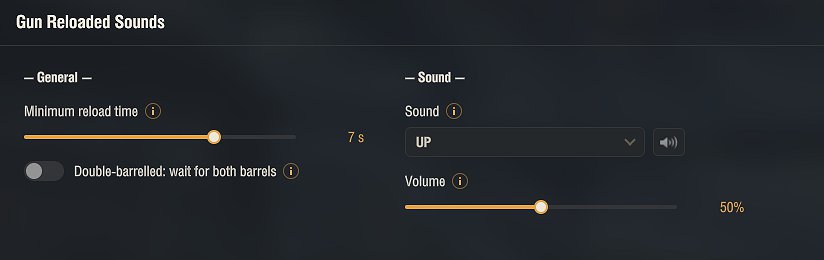
Gun Reloaded Sounds plays a sound the moment your gun is reloaded and ready to fire. No more staring at the reload timer – you hear when you can shoot, so you can keep your eyes on the battle.
Everything is set up in the garage through the in-game Mod configurator (mod settings menu).
Options:
• Choose your reload sound from a list, with a preview button right in the menu
• Magazine-aware: on autoloaders and autoreloaders it plays when the whole magazine is ready, not on every shell in the clip
• Minimum reload-time filter, so fast-firing autocannons do not spam the sound
• Adjustable volume
• Menu available in 9 languages
Configuration is saved to %APPDATA%\Wargaming.net\WorldOfTanks\mods\Aslain\gunreloadedsounds\gunreloadedsounds.json
Installation
1. Download the archive.
2. Open it and copy the mods folder into your World of Tanks game folder. The files go into mods\[version]\, where [version] is your current game client version (the folder name changes after each game update). The archive already contains the correct version folder, so a normal extract puts everything in place.
To make this mod work with your existing audio_mods.xml, just add the sound bank aslains_reloads.bnk to your current file. You’ll find audio_mods.xml in res_mods/x.x.x.x/audioww/. There’s no need to copy this mod’s res_mods/ folder
Credits:
Aslain
Downloads
| Name | Format | Size |
|---|---|---|
| GunReloadedSounds_1.1.00_2.4.0.1.zip | ZIP | 1.36 MB |
To start download click the filename. To open archive files use one of these programs: WinRAR, 7-Zip, WinZip. Some mod archives may need to be extracted before the mods will work.