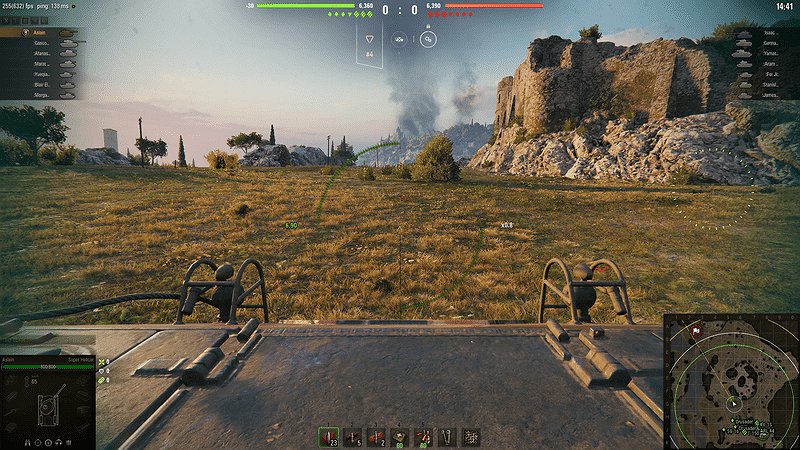
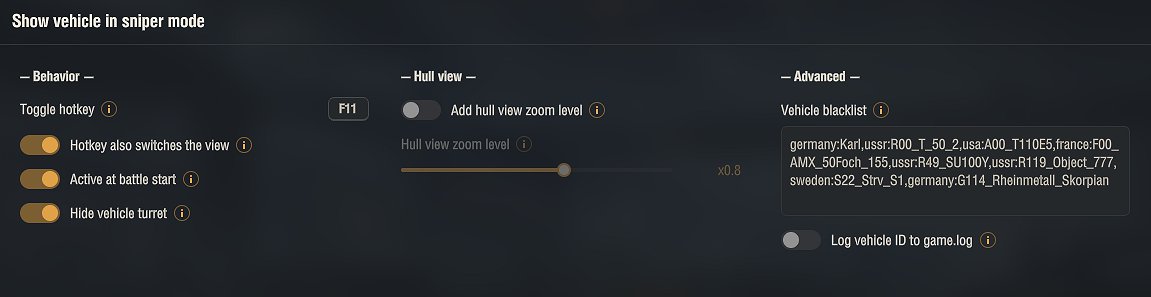
Displays your own tank’s hull in sniper mode, so you can see your vehicle while you aim.
The battle can start directly in the wide hull view, and one scroll down below the normal zoom levels brings it back at any time. The toggle hotkey shows or hides the hull instantly (default F11, rebindable, CTRL/ALT combinations supported). All options are available in the in-game mod settings menu.
Note: how the hull looks depends on the tank. On some tanks little of it is visible, and on others the hull or turret sticks into the camera and gets in the way. For tanks like that you have two options: add them to the Vehicle blacklist in the mod settings (the tooltip explains step by step how to find the tank ID), or simply hide the hull in battle with the toggle hotkey (default F11).
Installation
1. Download the archive.
2. Open it and copy the mods folder into your World of Tanks game folder. The mod goes into mods\[version]\ (the version folder changes after each game update) and the icon set into mods\configs. The archive already has the correct structure, so a normal extract puts everything in place.
3. Confirm overwriting if asked.
4. Start the game.
Open the settings in the garage through the Mod configurator (mod settings menu). The archive already contains the settings library (modsSettingsApi) needed for that menu; without it the mod runs with default settings.
Credits:
mod originally by Polyacov_Yury, totally reworked by Aslain
Downloads
| Name | Format | Size |
|---|---|---|
| ShowVehicle_2.1.02_2.4.0.1.zip | ZIP | 912.33 KB |
To start download click the filename. To open archive files use one of these programs: WinRAR, 7-Zip, WinZip. Some mod archives may need to be extracted before the mods will work.