Effect Control is a performance-focused World of Tanks mod that disables many visual effects which cannot normally be controlled through the game settings.
Removing unnecessary particles, prefabs, smoke, decals, lighting, and environmental effects can reduce GPU and CPU workload, improve FPS, reduce frame-time spikes, and make busy combat scenes feel smoother. The exact improvement depends on your hardware, map, camera position, and the number of effects occurring.
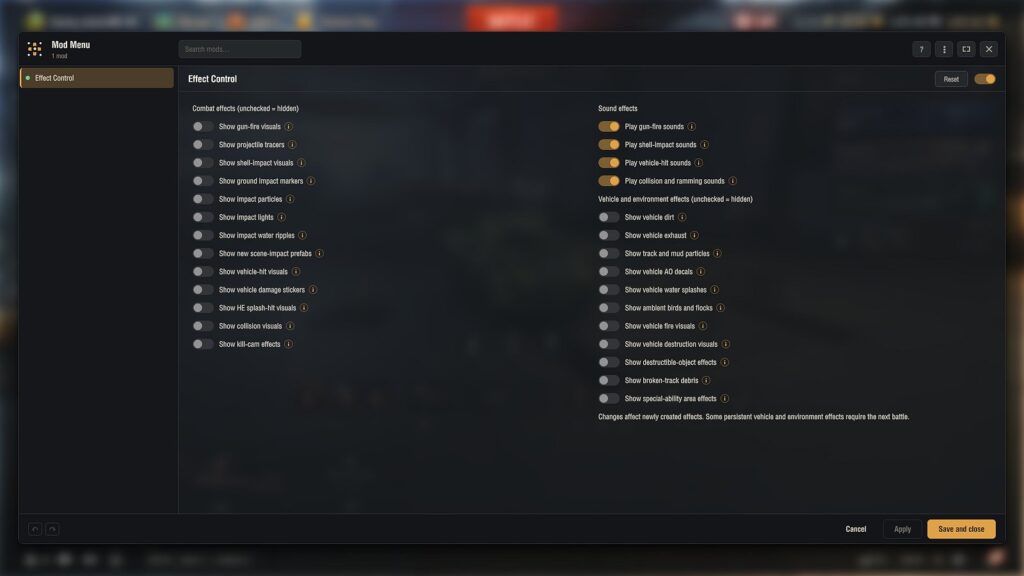
All options are available through the included Aslain Mod Menu and are organized into separate combat, environment, and sound columns.
💥 Combat effects
You can independently disable:
New CGF/prefab gun-firing effects
Traditional muzzle flashes and gun-fire effects
Ground waves and firing explosions
Projectile models and tracers
Shell-impact effects
Ground-impact marks and decals
Impact dust, sparks, and particles
Impact lights
Water-impact ripples
New CGF scene-impact effects
Vehicle-hit particles and prefabs
Penetration and damage stickers
HE splash-hit effects
Collision and ramming particles
Kill-camera trajectory and impact effects
Ground-impact marks have their own option. You can keep them visible for detecting blind-shot impacts while disabling the more demanding impact graphics.
🌲 Vehicle and environment effects
You can also disable:
Vehicle dirt accumulation
Exhaust smoke
Track, mud, and slipping particles
Vehicle ambient-occlusion decals
Vehicle water splashes
Ambient birds and flocks
Burning-vehicle flames
Vehicle destruction and ammunition-rack effects
Destructible scenery and falling-tree effects
Broken-track debris
Special-ability and airstrike area effects
⚠️ Disabling special-ability effects can remove useful visual warnings.
🔊 Independent sound controls
Combat sounds remain enabled by default, even when their corresponding graphics are disabled. Separate controls are provided for:
Player and enemy gun-fire sounds
Shell impacts against terrain, water, and scenery
Penetration, ricochet, and blocked-hit sounds
Collision and ramming sounds
This lets you improve performance by removing graphics without making the battle silent.
⚙️ Defaults and compatibility
FPS-focused visual suppression is enabled by default.
Combat sounds remain enabled by default.
Vehicle outlines remain available.
Armor flashlight behavior is not modified.
Includes translations for all 25 supported languages.
Includes Aslain Mod Menu and OpenWG GameFace.
The largest improvements should appear during effect-heavy moments with frequent firing, impacts, smoke, moving vehicles, destruction, and explosions. Results vary between systems, and no fixed FPS increase is guaranteed.
For Support / Questions / Suggestions visit: https://discord.gg/DqZ8fuX43C
Support me on Patreon: https://www.patreon.com/c/Gravity_Assist
Credits:
Gravity_Assist
Downloads
| Name | Format | Size | Description |
|---|---|---|---|
| gravity.effect_control.2.4.0.0.1.0.1.zip | ZIP | 1,013.98 KB | 2.4.0.0 |
To start download click the filename. To open archive files use one of these programs: WinRAR, 7-Zip, WinZip. Some mod archives may need to be extracted before the mods will work.