AutoAim Indication+ makes it easier to activate the game’s standard auto-aim and shows its state on screen.
It adds no aimbot behavior. It only triggers the normal in-game auto-aim, and only on a target you are actively aiming at. Put your reticle (the center aiming point) on a spotted enemy so the game highlights it with the usual outline, and the mod then locks the standard auto-aim on that target. If the enemy is behind cover, or you cannot place your reticle on it to highlight it, the mod does nothing. It never aims at weak spots, never calculates lead, and never locks through obstacles.
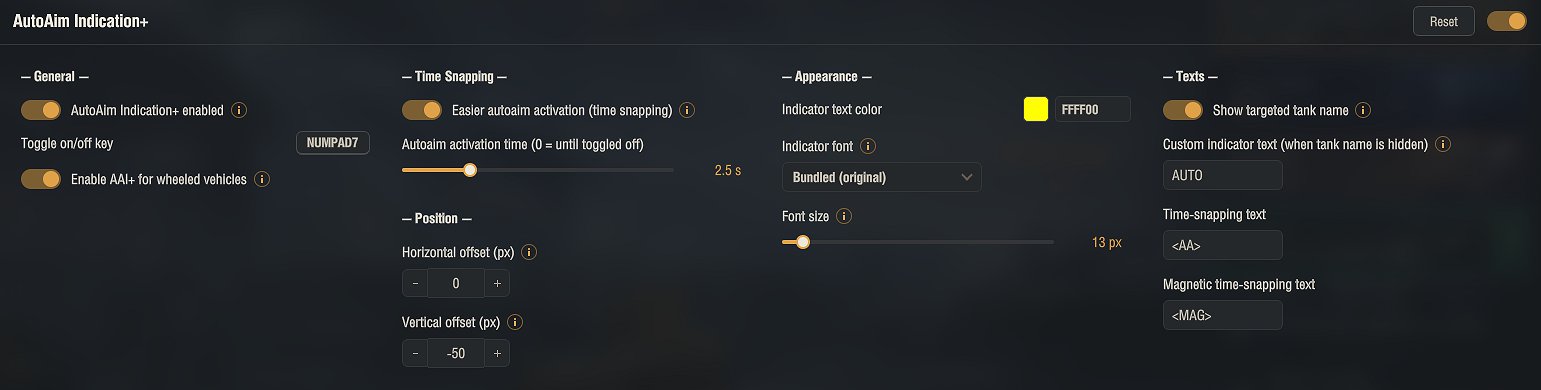
A slider sets how long the mod keeps waiting for a highlighted target after you press the key (0 means until you toggle it off).
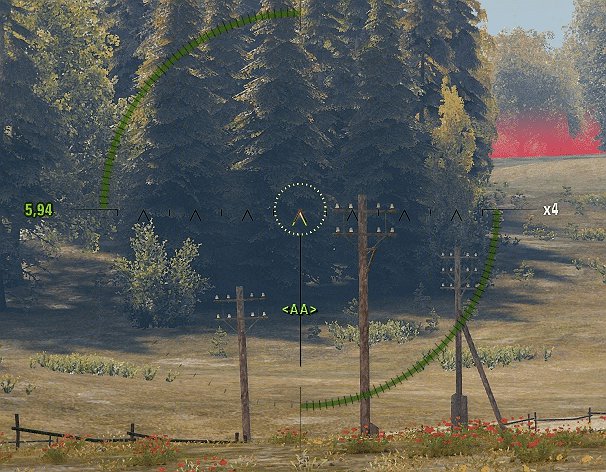
While auto-aim is active, an indicator near the center of the screen shows the state. It can display the name of the targeted tank or your own custom text.
Options:
• Toggle key to enable or disable the mod during battle
• Activation time (how long it waits for a highlighted target)
• Indicator text, color and font (several built-in game fonts)
• Indicator position (horizontal and vertical offset)
• Optional support for wheeled vehicles
All settings are available in the garage through the in-game Mod configurator (mod settings menu). The configuration is saved to %APPDATA%\Wargaming.net\WorldOfTanks\mods\Aslain\autoaimindication\AutoaimIndication.json
Because it only helps activate the standard auto-aim on a target in your line of sight and adds nothing beyond the vanilla aim lock, this mod complies with the Wargaming Fair Play Policy. It has been reviewed by Wargaming and confirmed as allowed, and using it cannot result in a ban.
Installation
1. Download the archive.
2. Open it and copy the mods folder into your World of Tanks game folder. The files go into mods\[version]\, where [version] is your current game client version (the folder name changes after each game update). The archive already contains the correct version folder, so a normal extract puts everything in place.
3. Confirm overwriting if asked.
4. Start the game.
Open the settings in the garage through the Mod configurator (mod settings menu). The archive already contains the settings library (modsSettingsApi) needed for that menu; without it the mod runs with default settings.
Credits:
original mod by Krzysztof Chodak; maintained over the years by OldSkool, RaJCeL, Ktulho, budyx69 and Heliomalt. Current version by Aslain.
Downloads
| Name | Format | Size |
|---|---|---|
| Autoaim_indicator_Plus_2.1.02_2.4.0.1.zip | ZIP | 952.63 KB |
To start download click the filename. To open archive files use one of these programs: WinRAR, 7-Zip, WinZip. Some mod archives may need to be extracted before the mods will work.