Currently all of my mods are not updated yet on WGMods.
WGMods doesn’t let me even to update all my mods.
Use then my GitHub repository to download them: https://github.com/Kurzdor/wotmods-public/
Discord support server:
https://discord.gg/3WBstp8nKn
Support my work:
https://donate.kurzdor.me
——————————————————————————————
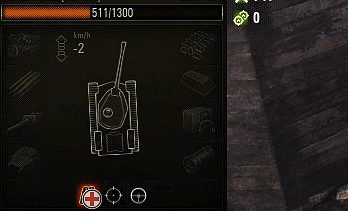
This modification shows your current equipment and directive in battle near consumables panel.
You can drag panel in battle using Ctrl + Left Mouse Button to anywhere you need, hide panel using Ctrl + H hotkey and reset panel position using Ctrl + R.
Modification has 2 working modes – show always and only by pressing and holding Alt button. The default one is first.
configuration
To configure mod you have to edit configuration file located in %wotroot%/mods/configs/battleEquipment/config.json, where %wotroot% is your game root folder.
For this purpose, use Notepad++, Visual Studio Code or any other text editor that supports opening and saving JSON files in UTF-8 coding.
The needed key to edit – mode.
Installation
Download modification
2. Unpack it to the game root folder
Credits:
Kurzdor
Downloads
| Name | Format | Size | Description |
|---|---|---|---|
| me.kurzdor.battleequipment_3.4.12.zip | ZIP | 384.53 KB | 2.2.0.0 |
| kurzdor.battleEquipment_1.8.0.zip | ZIP | 123.57 KB | 1.16.1.0 |
To start download click the filename. To open archive files use one of these programs: WinRAR, 7-Zip, WinZip. Some mod archives may need to be extracted before the mods will work.